
 Go to US Store


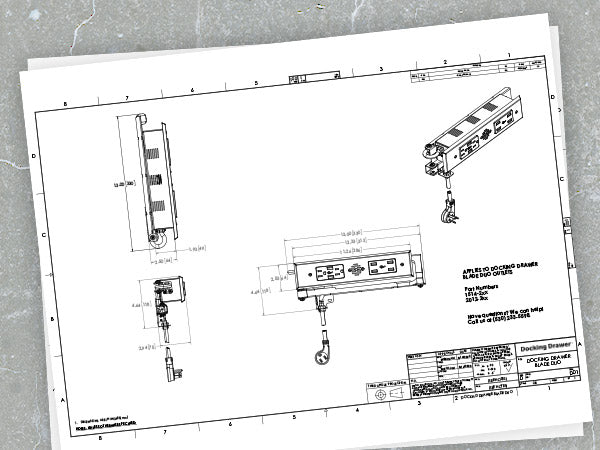
| Imperial | Metric | |
| Outlet Width | 13” | 330mm |
| Outlet Height | 4.64" | 118mm |
| Outlet Depth | 2.5" | 64mm |
| Receptacle Box Depth | 1.93" | 49mm |
| Cover Plate Height | 2.52" | 64mm |
| Cover Plate Width | 7.18" | 182mm |
| Cover Plate Thickness | 0.29" | 7.5mm |
| Cable Management Arms Height | 3" | 76mm |
| Cord Length (15 amp) measured from the rear mounting bracket | 42" | 1.07m |
| Cord Length (20 amp) measured from the rear mounting bracket | 36" | 0.9m |




What Our Customers Are Saying
- RTR T. B.Verified BuyerReviewing20 amp Blade In Drawer OutletI recommend this productRated 5 out of 5 stars1 week agoPerfect for outfitting a vanity drawer for a hair dryer or similar appliance.
Well constructed. Perfect for installation in a bathroom vanity…
- JKJosiah K.Verified BuyerReviewing15 amp Blade Duo In Drawer OutletI recommend this productWas this your first Docking Drawer project? YesI am a - HomeownerRated 5 out of 5 stars1 week agoEssential organization!
The in drawer outlet has been a lifesaver for organizing our devices to charge throughout the day and night. It gives us a “home base” for devices to land and have their cord ready to use at any time. This helps us stay organized in knowing where the cords are and where devices can be found, anything from the dog’s collar, to cellphones and then easily have the plugs available too if needed!
- JMJohn M.Verified BuyerReviewing15 amp Blade Duo In Drawer OutletI recommend this productWas this your first Docking Drawer project? YesI am a - ContractorRated 5 out of 5 stars3 weeks agoNice Product
It is nice to dedicate a drawer to charging all the stuff and not have it all over the countertops. The installation was quite simple and the results are a neat area to charge all the devices.
Thanks for a great and safe product!
- FGFaruk G.Verified BuyerReviewing15 amp Blade In Drawer OutletI recommend this productWas this your first Docking Drawer project? YesI am a - ContractorRated 5 out of 5 stars1 month agoinstall of drawer outlet at the ritz carlton
gorgeous unit. beautifully made and crafted. easy to use
- FGFaruk G.Verified BuyerReviewing15 amp Blade Duo In Drawer OutletI recommend this productWas this your first Docking Drawer project? YesI am a - ContractorRated 5 out of 5 stars1 month agoin drawer outlet installed for rift cut white oak vanity
gorgeous outlets for vanity in bathroom at the ritz carlton