
 Go to US Store


| Imperial | Metric | |
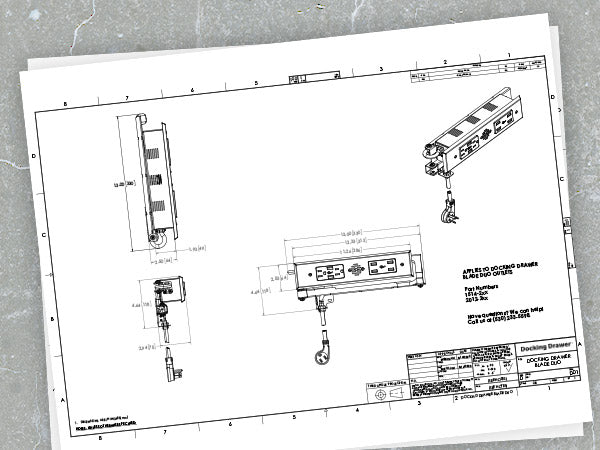
| Outlet Width | 13” | 330mm |
| Outlet Height | 4.64" | 118mm |
| Outlet Depth | 2.5" | 64mm |
| Receptacle Box Depth | 1.93" | 49mm |
| Cover Plate Height | 2.52" | 64mm |
| Cover Plate Width | 11.26" | 286mm |
| Cover Plate Thickness | 0.29" | 7.5mm |
| Cable Management Arms Height | 3" | 76mm |
| Cord Length (15 amp) measured from the rear mounting bracket | 42" | 1.07m |
| Cord Length (20 amp) measured from the rear mounting bracket | 36" | 0.9m |




What Our Customers Are Saying
- KDKalyn D.Verified BuyerReviewing15 amp Blade Duo In Drawer OutletI recommend this productWas this your first Docking Drawer project? YesI am a - HomeownerRated 5 out of 5 stars2 weeks agoGreat product
This docking drawer was super easy to install and worked perfectly for our charging station!
- KPKerry P.Verified BuyerReviewing15 amp Blade In Drawer OutletI recommend this productWas this your first Docking Drawer project? YesI am a - HomeownerRated 5 out of 5 stars3 weeks agoBathroom vanity drawer receptacle.
This is a great product. Was a little apprehensive at first, but I am now convinced it was the way to go. Very easy to install!
- LILM i. t. N.Verified BuyerReviewing15 amp Blade Duo In Drawer OutletI recommend this productWas this your first Docking Drawer project? YesI am a - HomeownerRated 5 out of 5 stars3 weeks agoExactly right!
We've just started using our newly installed Blade Duo outlet, & it's just what we wanted. The clutter is gone! Everything's so neat & tidy while hiding inside that drawer the work is happening, you'd just never know it. The arm that allows everything to open & close with no kinks & no jam-ups is brilliant. My contractor installed it lickety-split. I couldn't ask for more.
At first I looked at less-expensive options. I read reviews about all the problems & pitfalls & drawbacks, & kept coming back to Docking Drawer. So glad I did. It's well worth it, & it'll serve us well for years to come.
- SWScott W.Verified BuyerReviewing15 amp Blade Duo In Drawer OutletI recommend this productWas this your first Docking Drawer project? NoI am a - Cabinet makerRated 5 out of 5 stars1 month agoVanity Drawers
Very well built and great design.
- OGOlivier G.Verified BuyerReviewing15 amp Blade In Drawer OutletI recommend this productWas this your first Docking Drawer project? NoI am a - Cabinet makerRated 5 out of 5 stars2 months agoAnother great buy
I have ordered several times from Docking Drawer directly now and each time is the same - professional and timely. They are really good about communication and the product comes exactly as expected. This is now my easiest commodity to purchase for my custom builds.